



[bs_smart_list_pack_start][/bs_smart_list_pack_start]
Introduction

We have been making build guides since 2013 and, while it has been well received by our readers and followers, we noticed the guides lack education. Yes, we put descriptions on the components but it doesn’t give a better understanding about the components. What happens when some of the components in your planned AMD Ryzen build is not available and you are in the store already? Not all the time you will encounter honest salespersons and you must know how to select alternative components. After reading this guide, we’re confident you won’t easily get victimized by sellers who only care about getting your money. Don’t worry, we will not bombard you with complicated terms and formulas on how to compute theoretical performance on gaming. What we will give you is basic and easy-to-understand information about each component.
To help in making the guide as concise as possible, we will be using acronyms.
CPU – Central Processing Unit
DIMM – Dual In-line Memory Module
GPU – Graphics Processing Unit
HDD – Hard Disk Drive
LGA – Land Grid Array
OS – Operating System
PCI-E – Peripheral Component Interconnect Express
PGA – Pin Grid Array
PSU – Power Supply Unit
RAM – Random Access Memory
SATA – Serial Advanced Technology Attachment
SSD – Solid State Drive
USB – Universal Serial Bus
Quick Overview
| Component | What It Is |
 | A PC can function without a case but think of it as a house for all the other components. The case protects them from dust, rodents, and accidental physical damage. |
 | The CPU is the one responsible for all the non-graphics stuff in games such as physics and AI (Artificial Intelligence). It must be fast enough to keep up with the GPU. |
 | This is where you connect the CPU, graphics card, memory modules, and storage devices. |
 | Frequently used data in the HDD or the SSD are temporarily stored in the memory when the computer is in operation. |
 | This is what makes the PC gamer happy. The GPU on the graphics card is the component that has the biggest impact on game performance. |
 | The PSU converts the AC electricity (100 V – 240 V) from the convenience outlet in your house to DC electricity (12 V, 5 V, 3.3 V) that the PC components can use. |
 | This is where the files of the OS and the applications are stored. Also functions as storage of user’s files (pictures, videos, music, etc.) |
 | Same function with HDD but is much faster and also more expensive. |
 | This is where the output of the graphics card goes to. |
 | Protects the CPU from damage due to excessive heat. |
 | An air-moving device. Depending on the orientation, it can function as an intake fan to push cool air into the case or as an exhaust fan to eject hot air out of the case. Plays a big role in cooling all the components. |
On the next page, we’ll discuss further each of the components.
Case
WHAT IT IS: A PC can function without a case but think of it as a house for all the other components. The case protects them from dust, rodents, and accidental physical damage.
EFFECT ON PERFORMANCE: The case does not affect performance. However, if the air flow inside the case is not good, the CPU and the GPU might get too hot and will automatically reduce speed which will result to lower game performance. Air flow inside the case will be further discussed in the Cooling System section.
COMPATIBILITY CHECK: The form factor of the case you choose will heavily affect your choices for the motherboard, graphics card, and PSU.
| Case Form Factor | Compatible Motherboard Form Factor | Max. Graphics Card Length (mm) | Compatible PSU Form Factor |
| ATX | ATX, Micro-ATX, Mini-ITX | usually 300 – 380 | ATX |
| Micro-ATX | Micro-ATX, Mini-ITX | usually 300 – 380 | ATX |
| Mini-ITX | Mini-ITX | usually 200 – 260 | usually SFX only |
It’s hard to tell what motherboard form factor is supported by just looking at the case. To ensure you are getting a case that fits your requirements or preferences, check the product specifications shown in the product box and in the manufacturer’s website.
CPU (Central Processing Unit)
WHAT IT IS: The CPU is the one responsible for all the non-graphics stuff in games such as physics and AI (Artificial Intelligence).
EFFECT ON PERFORMANCE: The CPU must be fast enough to keep up with the GPU. Specifications like CPU speed and number of CPU cores are not reliable in determining game performance especially when comparing CPU’s from different brands. CPU bottleneck calculators you see in the internet are non-sense and should be avoided because CPU bottleneck in games is measured through game benchmarking and not calculated based on the specs of the CPU and the GPU.

COMPATIBILITY CHECK: An Intel CPU can only be installed on a motherboard with LGA socket type and an AMD CPU can only be installed on a motherboard with PGA socket type. The difference between an Intel CPU and an AMD CPU can easily be seen by looking at the underside of the processor package. As shown below, AMD CPU’s have pins while Intel CPU’s have contact pads. (Photos from Guru3D)

Also check the socket type and the chipset required by the CPU because it will guide you in choosing a motherboard. Go to Appendix for more details.
HOW TO INSTALL: The process of installing the CPU onto to the motherboard is indicated in the manual that comes with the CPU. You should read the manual.
Motherboard
 WHAT IT IS: This is where you connect the CPU, graphics card, memory modules, and storage devices.
| Component | Where to Connect on the Motherboard |
| CPU | 1 – CPU socket |
| Graphics Card | 2 – PCI-E Slot |
| Memory Module | 3 – DIMM Slot |
| HDD and SSD | 4 – SATA port (SATA cable required) |
EFFECT ON PERFORMANCE: None.
COMPATIBILITY CHECK: The 3 most important specifications to check are CPU Support, CPU socket, Memory Support, and Form Factor. Those can be seen at the rear side of the product box as shown below.

According to the specifications, the Gigabyte Z270N Gaming 5 is only compatible with Intel 6000-series and 7000-series Core i7/i5/i3 processors, has LGA 1151 socket, supports only DDR4 memory, and has a Mini-ITX form factor while the Gigabyte AX370 Gaming 5 is only compatible with AMD Ryzen processors, has AM4 socket, supports only DDR4 memory, and has an ATX form factor. Complete and detailed specifications of a motherboard can be found at the manufacturer’s website. Go to Appendix for more details.

There are AMD motherboards and Intel motherboards that have almost the same model name which might be confusing. An example would be ASUS ROG Strix X370-F Gaming and ASUS ROG Strix Z370-F Gaming. The fool-proof way to distinguish them from each other is to check their sockets. Motherboards for Intel CPU’s have LGA socket type while motherboards for AMD CPU’s have PGA socket type.
Memory Modules
 WHAT IT IS: Because the current technology of HDD and SSD are still not fast enough to keep up with the CPU, frequently used data in the HDD or the SSD are temporarily stored in the memory when the computer is in operation. Memory is also commonly called as RAM.
EFFECT ON PERFORMANCE: In general, memory speed does not significantly affect game performance. The amount of memory, measured in Gigabytes (GB for short), must be sufficient so that game performance is not negatively affected. Memory amount and memory speed requirement varies with each game.
COMPATIBILITY CHECK: Currently, there are only 2 types for desktop memory – DDR3 and DDR4. You should buy the type that is supported by your chosen motherboard.
Graphics Card
WHAT IT IS: This is what makes the PC gamer happy. It enables the use of better image quality while maintaining playability of the game. Many people interchangeably use the terms “graphics card” and “GPU”. The GPU is the chip on the graphics card. Think of the graphics card as a “mini motherboard” where the GPU is installed. AMD and NVIDIA are the only manufacturers of gaming GPU’s but there are many graphics card manufacturers such as ASUS, Gigabyte, Inno3D, Palit, Sapphire, and ZOTAC. Graphics card manufacturers use the GPU’s from AMD and NVIDIA. To better explain – ASUS ROG Strix GTX 1060 6GB and Palit JetStream GTX 1060 6GB are graphics cards that use the NVIDIA GeForce GTX 1060 GPU.
EFFECT ON PERFORMANCE: The GPU on the graphics card is the component that has the biggest impact on game performance. The frame rate is directly proportional to the speed of the GPU. Higher frame rate means a more enjoyable gaming experience.

COMPATIBILITY CHECK: The length of the graphics card you will choose must be equal or less than the maximum graphics card length allowed by the case. Also take note of the number of auxiliary power connectors (a.k.a PCI-E power cables) required by the graphics card because it will guide you in choosing the appropriate PSU. All motherboards now are equipped with a PCI-E slot so you don’t have to worry if the graphics card you will be buying is compatible with your chosen motherboard.
Power Supply Unit (PSU)
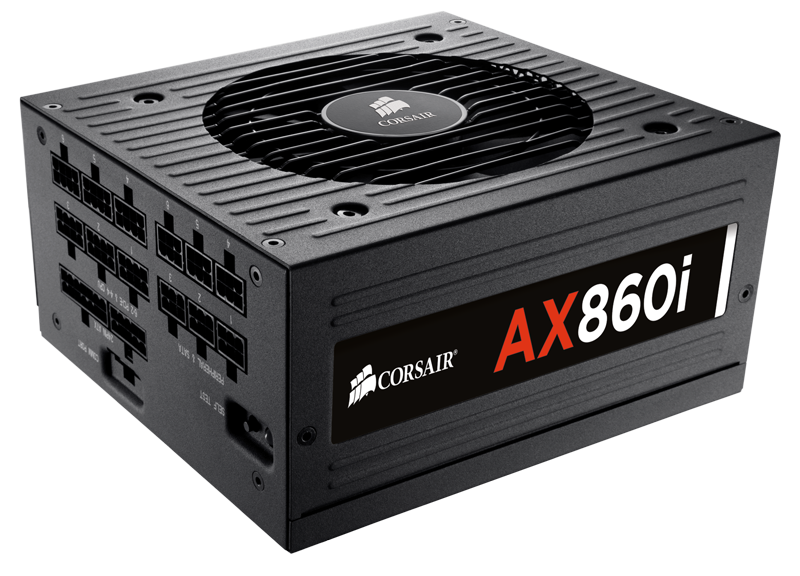 WHAT IT IS: The PSU converts the AC electricity (100 V – 240 V) from the convenience outlet in your house to DC electricity (12 V, 5 V, 3.3 V) that the PC components can use.
EFFECT ON PERFORMANCE: The PSU has no effect on performance but you might experience intermittent shutting down of the PC if the capacity of the PSU is insufficient for the demands of your PC. PSU’s of poor quality might explode when put under heavy load and can damage other more expensive components such as the CPU and the graphics card. Check our list of recommended PSU’s.
COMPATIBILITY CHECK: Any PSU of good quality that has a rated capacity of at least 500 watts have the necessary connectors to power up any gaming PC that has 1 graphics card. The most important spec to check is the PSU form factor. In general, an ATX PSU would only fit in a ATX case or a Micro ATX case. SFX PSU’s are designed for use with Mini ITX cases but they can also fit in a ATX case or a Micro ATX case provided that you use an SFX-to-ATX mounting bracket. Not all SFX PSU’s come with an SFX-to-ATX mounting bracket so, check first before buying. Go to Appendix for more details.
Storage Device
WHAT IT IS: This is where the OS and the applications are stored. Also functions as storage of user’s files (pictures, videos, music, etc.). The main advantage of SSD over HDD is speed. Applications load much faster when installed on an SSD.
EFFECT ON PERFORMANCE: None.
COMPATIBILITY CHECK: If you are buying multiple storage devices, check the specifications of the case and see the drive bay count for each drive form factor.

Monitor
WHAT IT IS: This is where the output of the graphics card goes to.
EFFECT ON EXPERIENCE: The monitor does not affect game performance but it does affect game experience. Size, native resolution, refresh rate, and response time are the most important specifications you should check before buying. Here is a sample comparison.
| LG 23MP68VQ | Viewsonic XG2703-GS | LG 29UM58 | ASUS ROG PG348Q | |
| Size | 23″ | 27″ | 29″ | 34″ |
| Native Resolution | 1920 x 1080 | 2560 x 1440 | 2560 x 1080 | 3440 x 1440 |
| Refresh Rate | 75 Hz | 165 Hz | 60 Hz | 100 Hz |
| Response Time (GTG) | 5 ms | 4 ms | 5 ms | 5 ms |
COMPATIBILITY CHECK: At least one of the connection ports of the monitor should match with what the graphics card supports. If the monitor has a variable refresh rate technology such as AMD FreeSync and NVIDIA G-Sync, check the monitor’s manual for the connection port required by the variable refresh rate technology.
CPU Cooler
WHAT IT IS: All devices that use electricity are not 100% efficient. It means that some of the power get wasted as heat. The function of the CPU cooler is to take the heat from the CPU.
EFFECT ON PERFORMANCE: If the CPU gets too hot, the CPU automatically reduces speed which negatively affects performance. A sufficient CPU cooler will prevent the CPU from getting too hot.
COMPATIBILITY CHECK: If you are replacing the stock CPU cooler, make sure the CPU cooler you will be buying has mounting brackets that will fit the mounting holes of the motherboard. Motherboard compatibility can be checked at the product box.
On the next page, we’ll give you a quick and practical guide on selecting components.
How to Select Components

Hi. If you jumped right to this page, please do yourself a favor and go back so you’ll learn the basics of each component.
It is easy to select components but the challenge is finding the combination of components that will fit the budget. Instead of making a build recommendation for each budget range, we checked the budget allocation for the CPU and the graphics card which are the 2 components that have the biggest impact on performance. Take not that the findings are based on the assumption that the build prioritizes functionality and balance between the CPU and the GPU.
These findings are just guides to make component selection easier. For example, don’t expect a GeForce GTX 1070 for a balanced build if the budget is just PhP 40,000. The cheapest GTX 1070 graphics card is around PhP 22,000 and it already takes about 50% of the total budget. For the other components except for the PSU, just get the cheapest one that suits your needs.
For Entry Level and Mainstream:
1. The CPU takes about 25% of the total budget.
2. The graphics card takes 25 – 30% of the total budget.
For High End:
1. The CPU takes about 20% of the total budget.
2. The graphics card takes 35 – 45% of the total budget.
| Entry Level | Price (PhP) | Mainstream | Price (PhP) | |||
| CPU | AMD Ryzen 3 1200 3.1 – 3.4 GHz 4 cores, 4 threads | 5,820 | 22% | AMD Ryzen 5 1600 3.2 – 3.6 GHz 6 cores, 12 threads | 11,310 | 23% |
| Motherboard | ASRock A320M-HDV | 3,160 | ASRock AB350M Pro4 | 4,620 | ||
| Memory | G. Skill Ripjaws V 8GBx1 DDR4 2400 | 5,250 | G. Skill Flare X 8GBx2 DDR4 2400 | 11,830 | ||
| Graphics Card | Inno3D GTX 1050 Ti 4GB | 6,850 | 26% | ZOTAC GTX 1060 6GB AMP! Edition | 14,050 | 29% |
| Storage Device | Western Digital Blue 1TB (WD10EZEX) | 2,400 | Western Digital Blue 1TB (WD10EZEX) | 2,400 | ||
| PSU | Corsair VS450 | 1,720 | Seasonic S12II-520 | 2,780 | ||
| Case | Deepcool Smarter | 1,120 | Deepcool Smarter | 1,120 | ||
| TOTAL | 26,320 | 48,110 |
| High End | Price (PhP) | Uber High End | Price (PhP) | |||
| CPU | AMD Ryzen 5 1600 3.2 – 3.6 GHz 6 cores, 12 threads | 11,310 | 18% | Intel Core i7 8700 3.2 – 4.6 GHz 6 cores, 12 threads | 18,710 | 20% |
| Motherboard | ASRock AB350M Pro4 | 4,620 | Gigabyte Z370M D3H | 8,340 | ||
| Memory | G. Skill Flare X 8GBx2 DDR4 2400 | 11,830 | G. Skill Ripjaws V 8GBx2 DDR4 2400 | 11,780 | ||
| Graphics Card | Palit GTX 1070 Dual Fan | 21,370 | 34% | Palit GTX 1080 Ti JetStream | 39,370 | 43% |
| OS Drive | Western Digital Green 240GB SSD | 4,370 | Western Digital Green 240GB SSD | 4,370 | ||
| Secondary Drive | Western Digital Blue 1TB (WD10EZEX) | 2,400 | Western Digital Blue 1TB (WD10EZEX) | 2,400 | ||
| PSU | Seasonic S12II-520 | 2,780 | Seasonic M12II Evo 620 watts | 4,000 | ||
| Case | InWin 301 | 3,500 | InWin 301 | 3,500 | ||
| TOTAL | 62,180 | 92,470 |
Appendix
CPU Family / Generation
| Generation | Codename | Models |
| Intel 8th Gen. Core | Coffee Lake | 6 cores, 12 threads – Core i7 8700K, 8700 6 cores, 6 threads – Core i5 8600K, 8600, 8400 4 cores, 4 threads – Core i3 8350K, 8100 |
| Intel 7th Gen. Core | Kaby Lake | 4 cores, 8 threads – Core i7 7700K, 7700 4 cores, 4 threads – Core i5 7600K, 7600, 7500, 7400 2 cores, 4 threads – Core i3 7350K, 7100 |
| Intel 6th Gen. Core | Skylake | 4 cores, 8 threads – Core i7 6700K, 6700 4 cores, 4 threads – Core i5 6600K, 6600, 6500, 6400 2 cores, 4 threads – Core i3 6320, 6100 |
| Intel 5th Gen. Core | Broadwell | 4 cores, 8 threads – Core i7 5775C 4 cores, 4 threads – Core i5 5675C |
| Intel 4th Gen. Core | Haswell | 4 cores, 8 threads – Core i7 4790K, 4790 4 cores, 4 threads – Core i5 4690K, 4690 2 cores, 4 threads – Core i3 4170, 4160, 4150, 4130 |
| AMD 2nd Gen. Ryzen | Zen | 8 cores, 16 threads – Ryzen 7 2700X, 2700 6 cores, 12 threads – Ryzen 5 2600X, 2600 4 cores, 8 threads, with iGPU – Ryzen 5 2400G 4 cores, 4 threads, with iGPU – Ryzen 3 2200G |
| AMD 1st Gen. Ryzen | Zen | 8 cores, 16 threads – Ryzen 7 1800X, 1700X, 1700 6 cores, 12 threads – Ryzen 5 1600X, 1600 4 cores, 8 threads – Ryzen 5 1500X, 1400 4 cores, 4 threads – Ryzen 3 1300X, 1200 |
CPU-to-Motherboard Compatibility
| CPU Generation | Socket | Compatible Chipsets |
| Intel 8th Gen. Core | LGA 1151 | Z370 |
| Intel 7th Gen. Core | LGA 1151 | Z270, H270, B250 Z170, H170, H110, B150 |
| Intel 6th Gen. Core | LGA 1151 | Z170, H170, H110, B150 |
| Intel 5th Gen. Core | LGA 1150 | Z97, H97 |
| Intel 4th Gen. Core | LGA 1150 | Z97, H97 Z87, H87, H81, B85 |
| AMD Ryzen | AM4 | X370, B350, A320 |
GPU Family / Generation
| CPU Generation | Codename | Models |
| AMD Radeon RX Vega series | Vega | RX Vega 64, RX Vega 56 |
| AMD Radeon RX 500 series | Polaris | RX 580, RX 570 RX 560, RX 550 |
| AMD Radeon RX 400 series | Polaris | RX 480, RX 470 RX 460 |
| NVIDIA GeForce GTX 1000 series | Pascal | GTX 1080 Ti, GTX 1080, GTX 1070 GTX 1060 6GB, GTX 1060 3GB GTX 1050 Ti, GTX 1050 GT 1030 |
| NVIDIA GeForce GTX 900 series | Maxwell | GTX 980 Ti, GTX 980, GTX 970 GTX 960 GTX 950 |
| NVIDIA GeForce GTX 700 series | Maxwell | GTX 750 Ti, GTX 750 |
| NVIDIA GeForce GTX 700 series | Kepler | GTX 780 Ti, GTX 780, GTX 770 GTX 760 GT 730 |
PSU Connectors
The images below are from Hardware Secret’s guide on PSU.
| Connector | Where To Connect |
 | Motherboard |
 | Motherboard |
 | Graphics card |
 | HDD and SSD |
 | Case fans and older type of HDD’s |
Motherboard Form Factor Comparison

Case Form Factor Comparison
Size comparison of (from left to right) Corsair 450D, Corsair 350D, Corsair 250D, and Silverstone RVZ01.


How A CPU Cooler Works


Ayaw ng GFC members nyan.
kano yung big 3 proc motherboard ram
Nasa page 3 po ung prices.
:)
Following
love the fanpage