



Introduction
 Going into 2023 we already have an idea how the new round of CPUs for laptops will go given what we got on the desktop side. For Intel, Raptor Lake gave us an E-core count bump as well as a slight increase in clock speeds. On the GPU side we have the new RTX 40-series GPUs from NVIDIA and between the two, these new generation of graphics have something that really stands out: Frame Generation.
Regardless of where you stand if Frame Generation is advantageous or not, unless you’ve really tried, you cannot deny the actual, visual fidelity that the technnology brings. While it does drop off at a certain point, if the performance is there, then its going to be rare on when its a bad thing to enable.
For our first taste of this year’s gaming laptops we have the 2023 edition of the AORUS 15 with SKU code BSF-73PH754SH which features a 13th-generation Intel Core i7-13700H as well as an NVIDIA GeForce RTX 4070 laptop GPU. Read on to find out more how this laptop performs in this review.
Video Review
Specification
| OS | Windows 11 Home |
| CPU | 13th Gen Intel Core i7-13700H Processor 5.0 GHz (24MB Cache, up to 5.0 GHz, 6 P-cores and 8 E- cores) |
| Video Graphics | NVIDIA GeForce RTX 4070 Laptop GPU 8GB GDDR6, Boost Clock 2175 MHz / Maximum Graphics Power 140W |
| Display | 15.6inch 16:9 Thin Bezel QHD 2560×1440, 165Hz, up to 100% DCI-P3, TÜV Rheinland-certified |
| System Memory | 16GB DDR5 RAM, 2x DDR5 slots (DDR5-4800, Max 64 GB) |
| Chipset | N/A |
| Storage | 1TB SSD Gen4, 2x M.2 SSD slots (Type 2280, supports 2x NVMe PCIe Gen 4.0×4) |
| Keyboard Type | Three-Zone RGB Keyboard, Per Key Macro |
| Optical Disk Drive | N/A |
| I/O Port | Left side: Right Side: Rear side: |
| Audio | 2x 2W Speaker Microphone DTS: X Ultra Audio Technology |
| Communications | WIFI: Wi-Fi 6E (802.11ax) (Triple band) 2×2 Bluetooth: Bluetooth V5.2 |
| Webcam | FHD (1080p) Webcam Build-in array Microphone Support Windows Hello Face Authentication |
| Security | Firmware-based TPM, supports Intel Platform Trust Technology (Intel PTT) |
| Battery | Li Polymer 99Wh |
| Adapter | 240W |
| Dimensions (W x D x H) | 36.0(W) x 27.2(D) x 2.09(H) cm/ 14.2(W) x 10.7(D) x 0.82(H) inch |
| Weight | 2.39 kg/5.27 lb |
Design and Layout – AORUS 15 2023


AORUS has had multiple attemps at their case design for their laptops and it seems this year they’re keeping it more uniform across all the brands as GIGABYTE’s laptops are now also sticking to black. With the exception of the GIGABYTE AERO laptops which are predominantly white, most of them along with GIGABYTE will be in black.
This does present a challenge as black isn’t really AORUS’ brand colors which is know for their anthracite and orange colorway. Still, this does have the advantage being very subdued when accompanied by minimal styling.
The AORUS 15 2023 features a simple, black housing with minimal styling. With the exception of the AORUS logo badge, the slash on the case and AORUS logotext on the edge of the laptop, the rest of he body is smooth and clean. Very utiitarian but the plastic used does feel really flimsy and may lead some to feel that this isn’t a premium product.
Unlike the GIGABYTE G5 GE, the AORUS 15 2023 has smaller intake holes at the bottom. Rubbers slightly raise the bottom area to help in intake from this side.
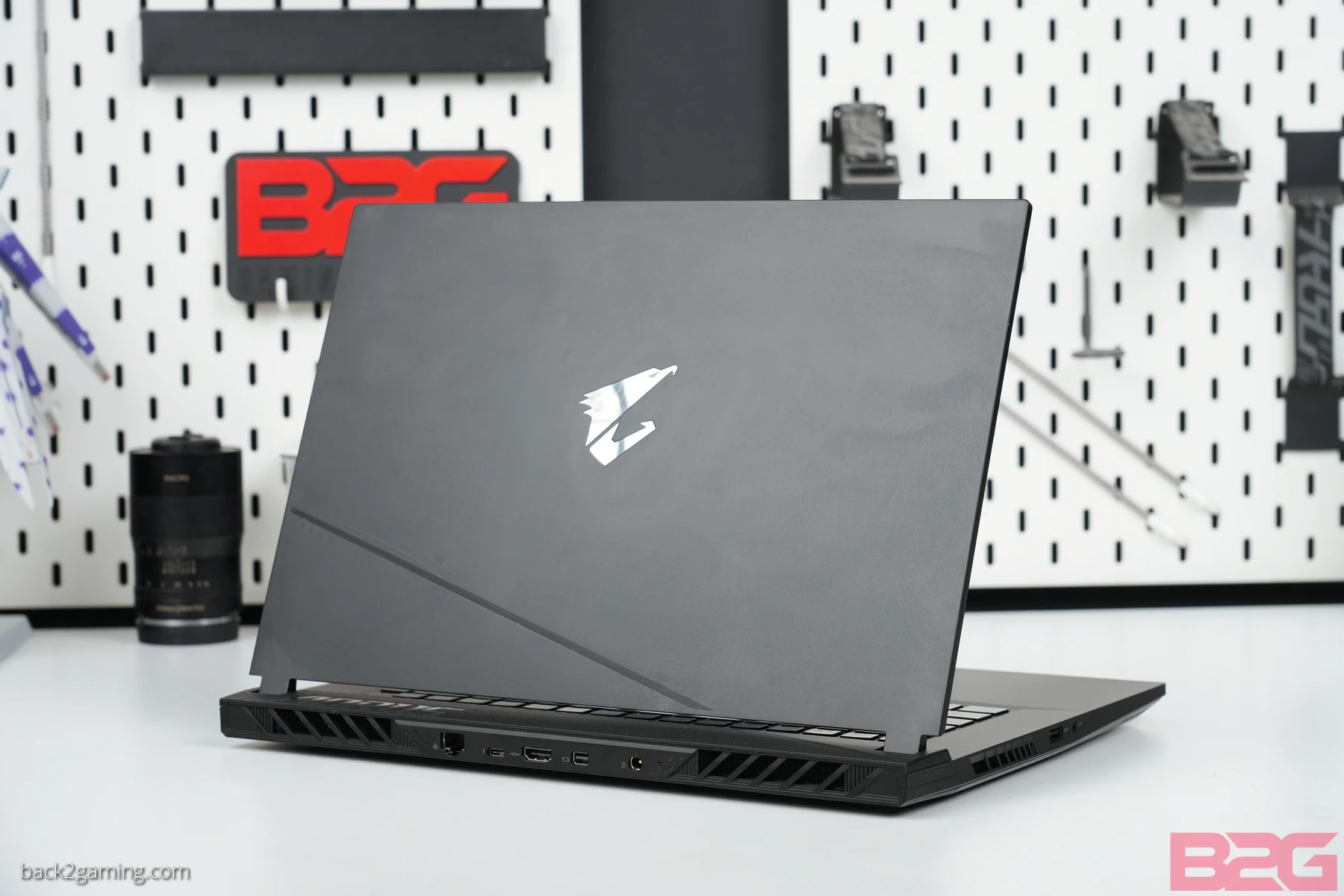
The lid is clean with a mirror finish badge in the center. There’s this weird line that cross the lower area for pure aesthetic but there’s no evident design language to suggest any uniformity with the overall body.
 One thing I love about AORUS laptops is that they utilize almost all edges of a laptop by having IOs. The same is still true for the AORUS 15 2023 with the rear IO ports comprising of a Ethernet jack, a USB-C Thunderbolt 4 port, a full-sized HDMI port, a mini DisplayPort and the DC charging barrel jack.


Perhaps one of the few laptops to still have more than 1 USB Type-A port, this model has 2 on the right side and 1 on the left. The left port also sits besides a combo audio jack for your headset.
Display and Peripherals – AORUS 15 2023

I’m a bit torn about AORUS’ material choice in this laptop but it does help keep the weight at a minimum with only 2.39kg in total. Maybe I’m just not seeing it but what are the lines of the AORUS 15 supposed to convey? There’s barely enough of them to form a logical theme and I feel it would’ve been better if AORUS stuck with a pure black design. Case aesthetic aside, once you open up the unit its fairly for traditional and the display really pops at you especially with the default wallpaper.

The AORUS 15’s keyboard layout is a standard AORUS 90% layout the squeezes the numpad and alphanumeric together. Typing experience is decent but I personally have a hard time adjust the sharper corners that AORUS uses versus rounder ones from other companies. RGB lighting is fairly better on the AORUS 15 2023 than the G5 though.

The AORUS 15 2023 keeps the touch pad at dead center which is the most logical layout on a laptop.

The AORUS 15 2023 bumps the screen to 2560×1440 at 165hz. The 16:9 ratio means that the display has a chin beneath the display versus more display on 16:10 displays. Still, if there’s something really great about this laptop, then its easily the display.
Battery Life
We start all test off with a battery life test to see how long the battery will last under office usage. We use PCMark 10 Battery Test which loops word processing, email, spreadsheet, and other office applications as well as browsing and teleconferencing over and over again until the laptop cuts off. Depending on your laptop and when power saving kicks in, there may be some battery left once the test cuts off which is anywhere from 10% to 2%.
Performance – Office and Productivity
Photo and Video
PugetSystems is a US-based system builder that provides high-performance computers built for workstation solutions. They developed an in-house benchmarking tool for various apps including Adobe Photoshop, Premiere Pro, After Effects, Davinci Resolve and a few others. These benchmarks put a professional-level workload on systems and are scored based on a reference system. The current version PugetBenchmark for Photoshop is scored against a Core i9-9900K system while the Premiere Pro benchmark is scored against a Ryzen 9 5900X. PugetBench is a plugin to the software it is named after and requires actual Adobe software to function. For a detailed description of the benchmark, see here (Ps) and here (Pr).
Office
Potentially the most used desktop software next to Windows OS is Microsoft Office. . This tests the responsiveness and system performance of the system when doing common office-users tasks, such as copying, pasting, cutting, adding images, resizing, saving, etc..
Gaming Performance Summary
For a full-hardware workout, visit https://benchmarks.ul.com for our system warm-up and stress test of choice.
For benchmarking methodology please see our game benchmark method guide.
Test results are gathered and produced on CapFrameX. This makes it easier for use to get both line graph comparison and raw averages without extra tools. Simply the easiest tool for benchmarking and its available for everyone to use, free of charge. Check it out at capframex.com.
Value & Conclusion
Performance-wise, the AORUS 15 2023 is a decent upgrade from what came before but not by a big margin. It does have the advantage of having more E-cores and a more powerful GPU, but given the space constraints, AORUS was really pushing it with their 15″ cooler design as there are cases where the RTX 4070 wasn’t performing at its peak.
Where it does get things right is its good display which is also quite fluid at 165hz. The ergonomics is also decent when it comes to the touchpad and with a bit of use, I believe one would grow accustomed to the keyboard layout of the AORUS 15 2023. Lastly, if your game supports it, Frame Generation does help really push things further on the AORUS 15 2023 and something that should really be on the table if you’re after a pure gaming laptop.
AORUS stills needs to work on their design language as the 2019 or earlier AORUS models had more personality to them. Cooling could also get some improvements but other than that everything is just pure nitpicking like the key shapes on the keyboard.
In closing, it’s hard to disregard the power of the AORUS 15 2023 and if you can tolerate a bit of fan noise, you can really maximize the performance of the RTX 4070 on this unit. Couple that with a beautiful display and just drown out the noise with a headphone and you got a great gaming laptop with the AORUS 15 2023.
The AORUS 15 2023 (BSF-73PH754SH) is available now at AORUS and GIGABYTE concept stores and authorized dealers. Check with your favorite dealers and e-tailers to see the latest price and availability as well as ongoing promotions.


